Hygrade Blog
The Ideal Patient Room Whiteboard: What to Include (and What to Avoid) for Better Patient Experience
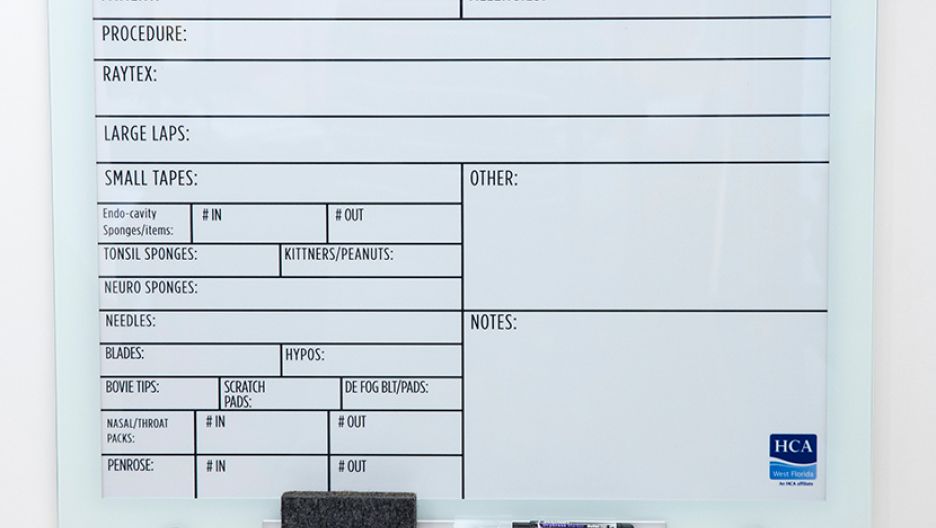
Patient room whiteboards are simple tools with an outsized impact. They clarify who is caring for the patient, what will happen today, and how to get help. Better communication directly supports patient experience, safety, and outcomes. Many hospitals now use both traditional whiteboards and glassboards for patient communication; throughout this guide, recommendations apply to either surface unless noted.
HCAHPS publicly reports communication scores, and hospitals use these data to guide quality and reimbursement priorities. The Agency for Healthcare Research and Quality (AHRQ) emphasizes patient experience as a key performance measure across various care settings. Whiteboards are often the most visible communication hub in the room—when designed well, they reduce uncertainty and build trust.
This guide outlines what to include, what to avoid, and how to implement whiteboards that drive measurable improvements.
Why Patient Room Whiteboards Matter for Patient Experience
Effective whiteboards turn passive information into active coordination. Patients and families see the plan, understand priorities, and know who to ask. This reduces anxiety and aligns expectations.
The Link Between Communication and Patient Satisfaction
Visible, consistent information lowers perceived uncertainty. A Cochrane review found patient education interventions significantly reduce anxiety in clinical settings, reinforcing the value of clear, timely information at the bedside.
HCAHPS measures communication with nurses, communication with doctors, and communication about medicines—domains that whiteboards directly support by prompting timely, consistent updates.
Regulatory and Accreditation Considerations
Regulators expect patient-centered communication. Whiteboards help operationalize those expectations.
Joint Commission: clear identification of care team; safe handoffs; language access; patient rights.
CMS Conditions of Participation: effective communication, informed decision-making, and accessibility.
HIPAA: Safeguard protected health information (PHI) from public disclosure.
To maintain compliance and streamline updates, many hospitals pair their whiteboard programs with integrated healthcare document management solutions. These systems help ensure staff have quick access to current templates, multilingual versions, and compliance-ready documents across departments.
Quick reference:
Requirement | Source | Whiteboard Implication |
Clear care team identification | Joint Commission | Display names/roles each shift |
Safe handoffs and updates | Joint Commission | Dedicated space for plan/status |
Effective communication | CMS CoPs | Plain language, multilingual support |
Privacy protection | HIPAA | No diagnoses or sensitive PHI in public view |
Essential Elements Every Patient Room Whiteboard Must Include
Whiteboards should prioritize information that patients value most and that staff can reliably update. Organize sections with clear labels.
Care Team Information
Today’s care team: attending physician, nurse, charge nurse, therapist(s)
Roles and shift times (e.g., 7 a.m.–7 p.m.)
Unit phone/extension for non-urgent needs
Optional: small photo tiles or icons to aid recognition
Example format:
Physician: Dr. [Name]
RN: [Name] (Day Shift)
PT/OT: [Name]
Charge RN: [Name] | Ext: ####
Daily Care Plan and Goals
The daily care plan section should clearly outline the most important goals and activities for the day so patients and families understand what to expect. This typically includes functional goals, such as “walk twice with assistance” or “use the incentive spirometer ten times,” as well as any scheduled tests or procedures with their approximate times to help patients prepare mentally and logistically. It should also indicate the patient’s current diet status and hydration expectations.
Additionally, highlighting medication timing, such as when the next pain dose is available, helps patients anticipate relief and reduces the need for call light requests. When these details are consistently updated and reviewed during bedside rounds, hospitals report smoother workflows, improved rounding efficiency, and fewer repetitive questions from patients and families.
Safety and Comfort Information
Fall risk status and precautions (bracelet, bed alarm, assistance level)
Allergies and key restrictions (e.g., NPO after midnight)
Pain management plan and pain scale
Call button location and expected response process
Suggested layout (top to bottom priority): Safety alerts, care team, today’s plan, comfort and questions.
Color coding:
Red = Safety
Blue = Care team
Green = Today’s goals
Purple = Questions for rounds
Design Principles for Maximum Readability and Usability
Whiteboard design should be consistent, legible from bed, and easy to update quickly. Durable, high-contrast print materials ensure longevity and legibility even in high-traffic care environments. Hospitals can customize finishes, dry-erase surfaces, and antimicrobial laminates to match unit needs.
Whiteboards vs. Glassboards: Choosing the Right Patient Room Communication Surface
While traditional patient room whiteboards remain widely used, many hospitals are evaluating glassboards as an alternative due to their hygiene, durability, and visibility advantages. Both surfaces support bedside communication, but their performance differs in ways that matter in clinical environments.
Why Surface Material Matters in Healthcare
Patient room communication tools undergo constant handling, frequent updates, and repeated exposure to hospital-grade disinfectants. The material used affects readability, infection control, lifespan, and maintenance requirements, all of which influence patient experience and staff efficiency.
Key Differences Between Whiteboards and Glassboards
Feature | Traditional Whiteboards | Glassboards |
Cleanability | Can stain, ghost, or show wear over time; harsh cleaners degrade the surface | Non-porous and highly cleanable; withstands bleach and disinfectants without damage |
Infection Control | Micro-scratches may trap residue or ink | Smooth, non-microabrasive surface minimizes contamination risk |
Durability | Typically lasts 1–5 years in high-use areas | Long-lasting; resistant to scratching, denting, and chemical wear |
Visibility & Legibility | Can fade or show ghosting, reducing readability | Crisp writing with consistent clarity; minimal glare if matte-finished |
Magnet Compatibility | Often magnetic (steel-backed) | Magnetic only if metal-backed; magnet strength reduced through glass |
Aesthetic & Professional Appearance | Functional, traditional | Modern, architectural design that complements updated patient rooms |
Cost Considerations | Lower initial cost; higher replacement frequency | Higher upfront cost; lower long-term maintenance and replacement needs |
Both surfaces support effective patient-provider communication, but glassboards offer superior durability, cleanability, and hygiene benefits, making them well-suited for high-acuity areas or facilities with stringent infection control protocols. Traditional whiteboards remain a cost-effective option, particularly in units with lower turnover or lighter cleaning demands.
Size, Placement, and Visibility Standards
Size: 24"x36" minimum for single rooms; 36"x48" for larger spaces
Placement: centerline ~54–60" from floor; visible from bed and seating
Lighting: avoid glare from windows/overhead lights; use matte surface
Accessibility: ensure clear sightlines for seated and supine positions; include space for large-print text
Typography and Color Coding Best Practices
Font size: 1" letter height (≈72 pt) for headers; ≥0.5" (≈36 pt) for body text
Contrast: dark text on white or off-white background; avoid low-contrast colors
Labels: use standardized icons/colors across units
Language access: pre-printed bilingual labels where needed; interpreter line posted
What to Avoid: Common Patient Whiteboard Mistakes
Overcrowding information: too much text reduces readability; prioritize what changes daily
Using medical jargon: replace terms like “PRN” with “as needed”
Inconsistent updates: stale dates or “TBD” erode trust and create safety risks
Poor handwriting: use printed labels and block letters; assign updated ownership
HIPAA violations: do not list diagnoses, test results, room numbers of other patients, or full SSNs/MRNs
Generic templates: adapt for unit needs (ICU vs. pediatrics)
Neglecting family input: include a family questions section and visitation notes
Do’s and Don’ts:
Do | Don’t |
Update each shift at a minimum | Leave yesterday’s plan posted |
Use plain language | Use abbreviations/jargon |
Highlight safety alerts | Post sensitive PHI |
Standardize layout across units | Allow ad hoc sections per room |
Customizing Whiteboards for Different Healthcare Settings
Whiteboards should reflect patient population, length of stay, and clinical goals.
Acute Care vs. Long-Term Care Considerations
In acute care, the emphasis is typically on the immediate plan for the day, upcoming tests or procedures, discharge readiness indicators, and key safety considerations that may change rapidly as the patient’s condition evolves.
In contrast, long-term care settings benefit from a focus on therapy milestones, daily routines, and personal preferences that support comfort and continuity over time.
Including family contact information or communication notes can also strengthen engagement and ensure care remains aligned with the patient’s long-term goals.
Specialty Unit Requirements
ICU/Critical Care: sedation goals, ventilator weaning progress, family update times
Pediatrics: age-appropriate language, “today’s helpers,” comfort items, activity calendar
Maternity: feeding schedule, lactation support times, safe sleep reminders, visitor policies
Behavioral Health: therapeutic goals, coping strategies, community meeting times, safety protocols
Implementing an Effective Whiteboard Program
A good board fails without a good process. Success requires standard work, accountability, and feedback. Hygrade supports these goals through patient care communication solutions that integrate print, signage, and process design to create consistent experiences across units.
Staff Training and Accountability
Define what gets updated, by whom, and when (e.g., at admission and each shift)
Use scripting during bedside rounds to review the board with the patient
Audit weekly for completeness and legibility; share unit-level compliance scores
Patient and Family Engagement Strategies
Prompt patients to write questions for the next rounding time
Include a “What matters to me today” space
Provide a quick guide card at admission explaining sections and update times
Technology Integration Options
Digital whiteboards can sync with EHR for auto-updates (e.g., tests, provider names)
Hybrid model: pre-printed boards with QR codes for education links
Evaluate cost, IT integration, downtime protocols, and staff usability before scaling
Measuring Impact: How Whiteboards Improve Patient Experience Metrics
Whiteboards should show measurable value within 60–90 days.
HCAHPS improvements in communication domains
Fewer call light requests for routine questions; faster nurse response times
Lower reported anxiety and higher satisfaction in post-stay surveys
Fewer communication-related safety events and clearer handoffs
Track these KPIs:
Metric | Baseline | 60 Days | Target |
HCAHPS: Nurse communication | |||
Call light use per patient-day | |||
Whiteboard update compliance | |||
Patient-reported anxiety (unit survey) |
Whiteboards work best when combined with other visual tools that reinforce communication and discharge readiness. For instance, patient folders can improve follow-through after discharge—see 4 Ways to Prevent Readmission with Patient Folders for complementary strategies.
Elevating Patient Experience Through Better Communication
Well-designed patient room whiteboards make care visible, understandable, and safer. They support patient-centered care and reinforce a culture of communication excellence.
Hygrade Business Group brings over a century of print and communication expertise to healthcare. Our team designs standardized, multilingual whiteboards, unit-specific templates, and durable materials that scale across systems.